


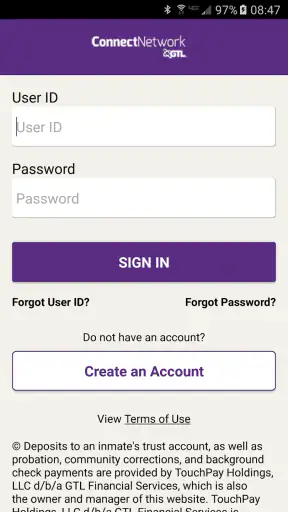
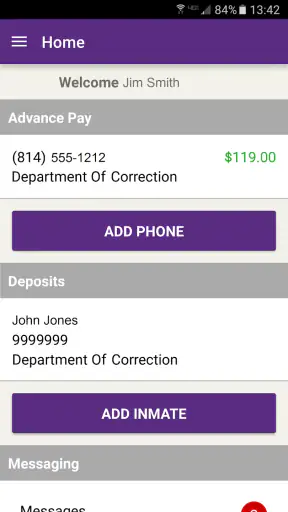
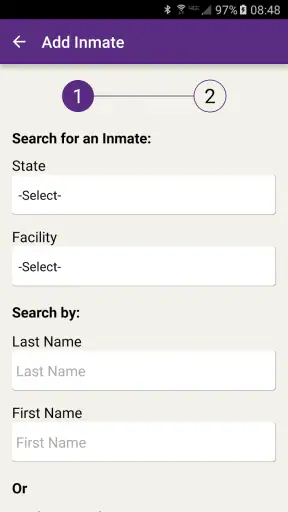
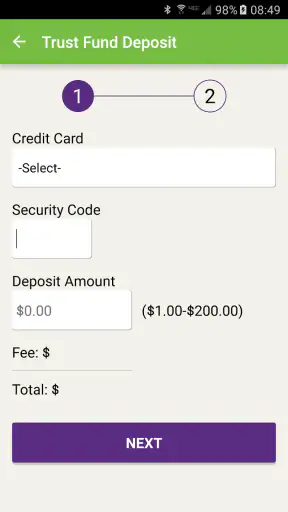
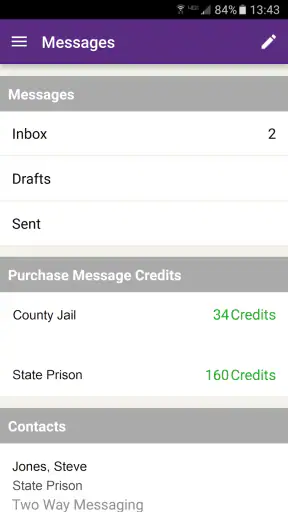
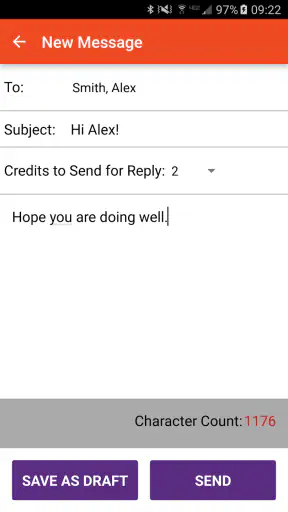
Staying in touch with someone who is incarcerated is rarely as simple as sending a normal message. The communication system may be separate from the apps I use every day, and small mistakes in an account, contact, or facility selection can turn a quick task into a frustrating one. ConnectNetwork is built for that specific situation. It is a free finance app from GTL ES that helps manage communication-related services for incarcerated loved ones, rather than trying to be a general-purpose banking or messaging tool.
After looking at how it fits into that process, my view is fairly clear: ConnectNetwork is most useful when your loved one’s facility relies on GTL services and you want one mobile place to handle the practical side of staying connected. It is not an app I would recommend casually to everyone, because its usefulness depends heavily on the facility and the services available there. For the right family, though, that focus is exactly its strength.
How ConnectNetwork fits into everyday communication
The app sits in the finance category, but that label does not fully explain what I would use it for. Its purpose is tied to supporting communication with incarcerated people, so the important question is not whether it replaces a standard bank app or a normal chat service. The better question is whether it makes the approved communication and account tasks around incarceration easier to manage from a phone.
That distinction matters. A person downloading it may expect a broad financial dashboard, while the real value is more specialized. I see it as a practical companion for families who need to keep track of a service connected to a correctional facility. The app can be relevant when communication involves account balances, deposits, or other facility-dependent services, but the exact experience can vary according to what the institution supports.
In ordinary use, I would begin by checking whether the relevant facility is supported before spending time setting everything up. That is one of the most important workflow tips with this app. A polished interface cannot solve a compatibility problem, and a family member should not assume that every facility offers the same options simply because the app is installed on a phone.
The developer is GTL ES, and the app has been available since January 27, 2015. Its current version is 4.4.2, and it runs on Android 8.0 or later. Those details make it accessible to many people using older devices, which is helpful in a situation where not every family member will have a recent phone.
The practical strength is its narrow purpose
What I appreciate most is that ConnectNetwork is aimed at a difficult, specific problem instead of pretending to be a universal social app. When a relative is incarcerated, the usual alternatives—ordinary messaging apps, email, or a standard money-transfer service—may not be accepted or connected to the facility’s communication process. In that context, a specialized app can be more useful than a familiar one that simply is not part of the approved system.
I also like the idea of keeping this activity separate from my everyday banking and personal messaging. That separation can make it easier to remember which funds or actions are intended for communication-related needs. It also reduces the chance of confusing a regular transfer with something that must be associated with a particular incarcerated person or facility.
One useful habit is to treat the app as an administrative tool rather than as a complete relationship-management solution. I would still keep my own notes about the person’s facility, identification details, and the purpose of each transaction. That may sound basic, but it becomes valuable when a family supports more than one person or when several relatives share responsibility. A dedicated app helps organize the process, but it does not remove the need for careful record-keeping.
Another practical insight is to make changes deliberately rather than tapping through quickly. Facility-linked services often involve names, locations, and account information that look similar. Before confirming anything, I would reread the selected person and institution and save confirmation details for my own records. This is not a glamorous feature, but it is the kind of routine that prevents avoidable confusion later.
Where the finance label can mislead
ConnectNetwork should not be judged like a full banking application. Someone looking for budgeting charts, bill reminders, broad account aggregation, or everyday payment tools will probably find the experience too narrow. Its financial role is connected to the incarcerated-person communication process, so its usefulness comes from that context rather than from offering a complete set of personal-finance features.
That is also why I would not use it as my only source of financial information. I would keep my normal bank or card provider available for checking the money actually leaving my account. The specialized app may help with the service it supports, but a regular banking app is still better for reviewing broader spending, managing a budget, or disputing unrelated transactions.
The same comparison applies to messaging. ConnectNetwork is not a replacement for WhatsApp, Signal, ordinary SMS, or email. Those tools are better when both people can use them freely and privacy, speed, and convenience are the priorities. ConnectNetwork becomes the more relevant choice when the correctional facility’s rules make those ordinary channels unavailable or unsuitable.
What the experience feels like for a family member
Imagine a relative who wants to help maintain contact with a parent in custody. They may need to identify the correct facility, connect the right person to their account, and manage a service associated with that institution. Instead of handling each part through unrelated websites, phone calls, and notes, they can start with one app designed around that relationship. That does not guarantee a smooth process, but it gives the task a clearer home.
In that situation, the app’s value is less about entertainment and more about reducing mental overhead. I would use it when I need to check the status of a communication-related arrangement or make a supported financial action without searching through old messages for instructions. The benefit is especially noticeable for someone who performs the same task regularly and wants a repeatable routine.
For occasional users, the experience may feel less rewarding. If I only need to help once, learning a specialized system can seem like extra work compared with using a familiar payment app. The trade-off is that the familiar option may not serve the facility at all. That is the central decision: convenience in the abstract versus compatibility with the actual correctional system.
I would also set expectations before relying on it for something urgent. An app can provide a convenient way to submit or manage an action, but it does not mean every step will happen instantly or that the facility will process it on the same schedule. If timing matters, I would leave room for institutional processing and keep any confirmation information until the matter is settled.
Meaningful friction and limitations
The biggest weakness is dependence on circumstances outside the app. ConnectNetwork can be useful only insofar as the relevant facility and service are connected to its system. That makes it less flexible than general finance apps. A user may install it with a clear goal and then discover that the available options do not match the needs of their particular institution.
This dependence can also make troubleshooting harder for ordinary users. When something does not work, the cause may involve the account, the selected facility, the incarcerated person’s records, the service rules, or the app itself. From a user’s perspective, those issues can look similar. I would avoid repeatedly submitting the same action while trying to diagnose a problem, because that can create more confusion than it solves.
There is also an emotional cost to this kind of friction. The person using the app is often not making a casual purchase; they are trying to support someone important. A confusing setup or unclear status can therefore feel more serious than a minor inconvenience in another finance app. My advice is to slow down, keep screenshots or confirmation records where appropriate, and contact the relevant support channel when the problem concerns a facility-specific rule rather than simply repeating the attempt.
Another limitation is that the app’s usefulness may be uneven across households. One family member may need frequent access, while another may only want occasional updates or a simple way to contribute. The first person is more likely to benefit from having a dedicated tool. The second may prefer to coordinate with a trusted relative who already understands the process, especially if installing and learning another app feels burdensome.
Who should use it and who should look elsewhere
I would recommend ConnectNetwork to people who have an incarcerated loved one connected to a participating GTL service and who want to manage related communication or financial tasks from an Android phone. It is also a sensible option for relatives who value a repeatable process and want to keep this responsibility distinct from their normal banking activity.
It may be particularly helpful for families divided across different cities or households. One person can take responsibility for checking the account or arranging a supported action, while another maintains personal contact through whatever communication method the facility permits. The app does not replace family coordination, but it can give that coordination a more concrete workflow.
I would skip it if I am searching for a general budgeting app, a standard digital wallet, or a private messaging service. I would also pause before installing it if I have not confirmed that the relevant facility uses the associated system. In those cases, a normal bank app, a facility-specific alternative, or direct guidance from the institution may be a better starting point.
The age rating is Everyone, which fits the app’s practical purpose, and it is free to download. Still, “free” should not be confused with every possible service being cost-free; financial actions and communication services can have their own terms. I would review the amount and destination carefully before confirming any transaction, just as I would with a banking tool.
Reach, maturity, and what the numbers suggest
ConnectNetwork has passed one million installs and holds a 3.3 average from roughly twelve thousand ratings, alongside about four thousand nine hundred written reviews. I would read that combination as a sign of a widely used but not universally smooth experience. The app clearly serves a real audience, yet the middling average suggests that practical frustrations matter and that users should approach it with realistic expectations.
Its long availability also gives it a certain familiarity in this specialized space. An app released in 2015 has had time to become part of established routines for families and facilities. At the same time, longevity does not automatically mean that every screen or workflow will feel modern. I would judge it by whether it helps with my specific facility-related task, not by expecting the polish of a leading consumer finance platform.
The current version, 4.4.2, supports Android 8.0 and newer. For me, that is a reasonable balance between compatibility and keeping an older device useful. If someone is using a phone below that system requirement, the practical solution is to use a supported device or another approved access method rather than assuming an update will solve the issue.
My final recommendation
ConnectNetwork is a specialized tool for a specialized responsibility. I would not describe it as the best finance app in a broad sense, because that is not really what it is trying to be. Its strongest case is much more focused: it can give families a mobile way to manage parts of staying connected with an incarcerated loved one when the relevant facility uses GTL services.
The app earns my recommendation for that audience, with one condition: verify the facility relationship first and use it carefully. Keep regular banking tasks in the normal banking app, keep personal records of important actions, and do not assume that a submitted request is the same as a completed one. Those habits address the main weaknesses without taking away the convenience of having a dedicated place for this process.
For families who fit that situation, ConnectNetwork can replace a scattered routine of notes, calls, and unrelated services with something more manageable. For everyone else, the narrow focus will feel limiting. My final verdict is therefore positive but specific: use it because it matches your facility’s communication system, not simply because it appears in the finance category.


